
Improve and retest
Copy page
Translate a failed stage into a concrete surface change, then test the same task again.
Let the failure determine the fix
Every evaluation should lead to a product decision: what to change, why it should help, and how to check it. Start with a finding in the dashboard, review the supporting evidence, apply a targeted fix, then compare the retest before choosing your next move.
Start with the observed failure and the product surface that can influence it. Flovia generates a remediation prompt your team can run with its coding agent. It ties the proposed edit to the task, the failed stage, and the behavior the retest should verify.
| Observed failure | Surface to inspect | Retest question |
|---|---|---|
| Target absent or not selected | Product positioning, documentation, landing page, llms.txt, and candidate descriptions | Does the target appear or get selected under the declared discovery conditions? |
| Wrong operation | API or MCP tool names, descriptions, and operation boundaries | Does the agent resolve the allowed operation? |
| Invalid arguments | Parameter meanings, input constraints, and worked examples | Does the request pass schema and semantic validation? |
| Unusable result or incomplete answer | Response contract, required fields, units, and interpretation guidance | Can the returned data support every completion criterion? |
These are diagnostic starting points. A changed page is not guaranteed to be retrieved or used by a model. The retest must either keep how the agent receives that information the same or change it explicitly.
From a finding to a change in your dashboard
Your private dashboard connects the evaluation summary, the supporting evidence, and implementation guidance. The excerpts below show the existing dashboard with identifying details replaced. The figures shown belong to those specific tests.
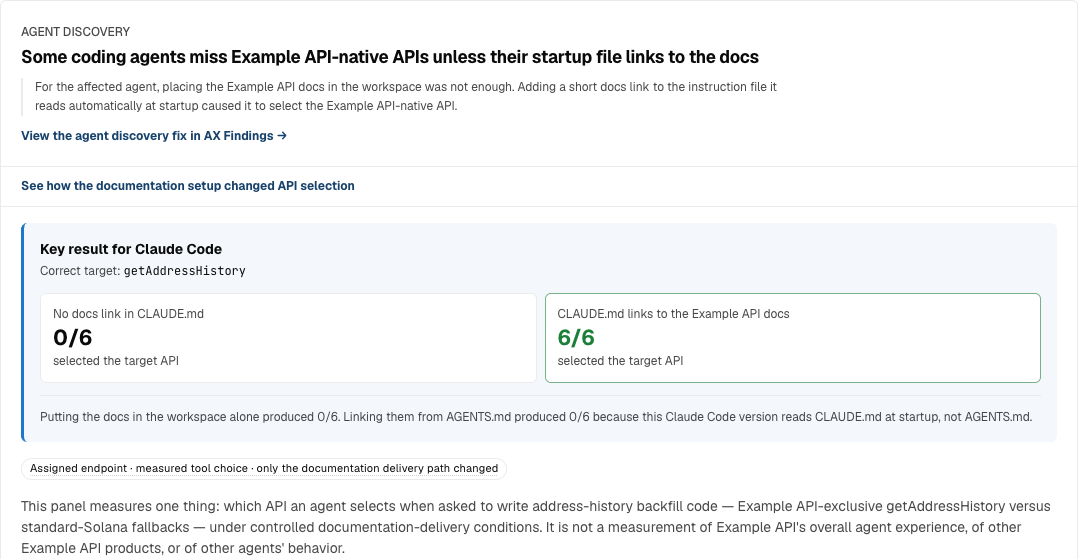
This example asks a coding agent to write transaction-history code and compares how the documentation reaches it. With a pointer in CLAUDE.md, selection of the target API changed from 0 of 6 runs to 6 of 6. This is the API-selection outcome observed for this task under the tested conditions.
Choose the next action — The overview lists recommended actions alongside their measured impact and the test behind each result. Use it to choose which finding to investigate first.
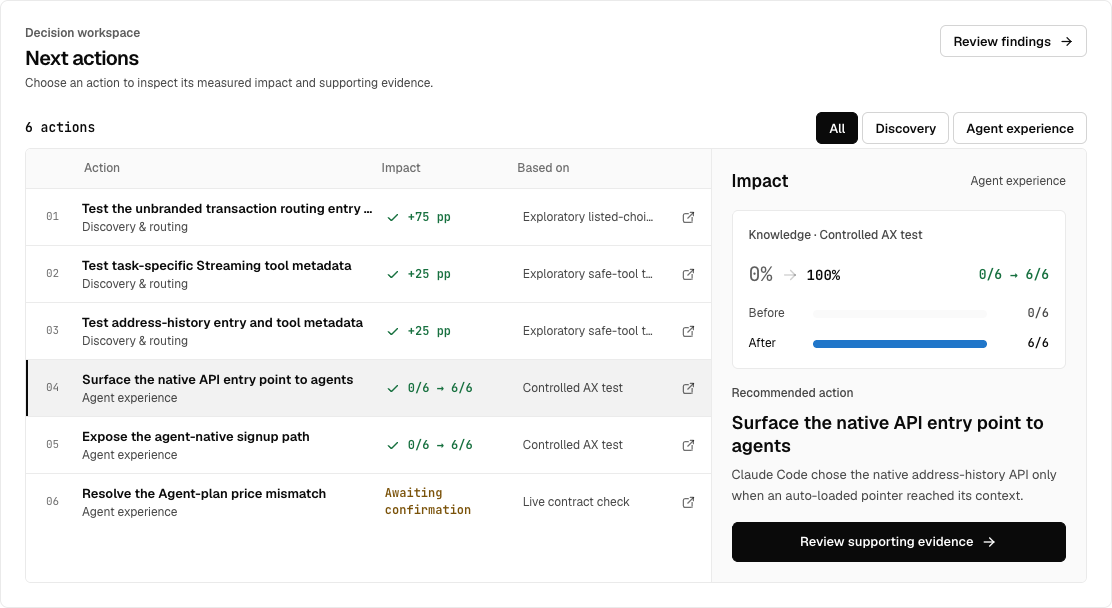
Read the finding — Open an action to see what the agents struggled with and which change is recommended. In this example, agents missed a native API and a signup path because those docs were not linked from the instructions they loaded at startup.

Inspect the evidence and prepare a fix — Open the supporting evidence to check the conditions and the recorded behavior. Copy the implementation prompt, review it with your team, and apply the change. After release, rerun the same test to decide whether to keep the change or revise it.
Example: a documentation improvement
A blockchain data API updated its documentation to clarify how to choose and use its capabilities. Comparing AI answers based on the earlier and updated documentation showed which explanations improved and where errors remained.
The comparison checked whether each answer picked an appropriate capability, identified the correct call target, and explained the work left on the developer’s side. Each item below was checked across five answers with the updated documentation.
| Capability checked | Before | After |
|---|---|---|
| Retrieve transaction identifiers only | 0 of 5 gave correct guidance: answers either could not identify the method or suggested a capability meant for another purpose | 5 of 5 explained how to retrieve identifiers only through the history-retrieval capability |
| Choose between history-retrieval methods | Could not explain the difference between retrieving original transaction data and a human-readable, parsed history | 5 of 5 explained the difference; 4 still named the wrong API for retrieving original data |
| Monitor transactions through WebSocket | Unclear whether calling the connection-preparation tool would start monitoring | 5 of 5 explained that the tool returns connection details or sample code and that the developer must run the monitoring process themselves |
| Receive real-time streams on a server | Did not correctly distinguish looking up connection information from generating connection configuration | 5 of 5 chose the configuration-generation capability and explained that the developer must establish the connection |
| Estimate priority fees and retrieve connection information | Mapped capabilities to incorrect call targets | 5 of 5 identified the correct call targets |
Improvements showed up in guidance on transaction-history methods, real-time connection preparation, and call targets for capabilities such as priority-fee estimates.
For developers, the expected benefit is fewer wrong implementation choices and fewer misunderstandings about whether preparing a connection starts a live service. The comparison observed better AI guidance; it did not measure any reduction in implementation errors or support requests.
These counts describe the answers checked in this comparison, not live API execution rates or success rates across other tasks and models. The next retest should check the API name separately from the explanation of when to use each method.
Example: make the historical-rate operation easier to choose
The following walkthrough uses the fictional exchange-rate task introduced in Scenario design. It illustrates how a team moves from a question to a decision; it does not report a customer result.
| Step | What to do |
|---|---|
| Question | Can an agent retrieve the EUR-to-USD rate for a specified date, rather than today's rate? |
| Evaluation | Run the task with a fixed tool catalog and a prepared response. Check the selected operation, the currency arguments, the date, and the final answer. |
| Finding | Suppose the agent selects the latest-rate operation. The first failure is operation selection, so inspect how the two operations are described. |
| Fix | Clarify when to use the historical operation and add a dated request example. Keep the tool schema and the response unchanged for this comparison. |
| Retest | Repeat the same task under comparable conditions. Check whether the agent chooses the historical operation and completes the answer correctly. |
| Decision | Keep the revised description if the tested behavior improves. If operation selection improves but the date argument is still wrong, make the date instructions the next test. |
A useful remediation prompt is testable
Observed failure: the agent chooses the latest-rate operation
for a request that specifies a historical date.

Revise the operation descriptions to distinguish latest and
historical rates. Document the date format and add one dated
EUR-to-USD example. Keep endpoint behavior and schemas unchanged.

Acceptance: for the same dated task, the agent selects
get_historical_rate and supplies the correct date and currencies.
Then verify that the final answer uses the returned rate and date.
Your team reviews and implements the change in its own environment. Flovia provides the diagnosis, remediation guidance, and verification, connecting the change to its retest results.
Decide what to do after the retest
Read the changed stage together with the final outcome. An improvement can remove one blocker and expose the next. Use that result to choose the next edit, keeping the parts that already work.
| Retest finding | Next action |
|---|---|
| Selection improves, but the wrong operation is still chosen | Keep the clearer product description and inspect the operation names, descriptions, and boundaries |
| The correct operation is called with invalid arguments | Clarify the parameter meanings and add an example with the task’s actual constraints |
| The result is usable, but an answer requirement is missing | Inspect the completion criterion and the relevant output field; make its meaning and use in the answer explicit |
| Results vary by model or task, or observations are missing | Inspect those groups and failure records before choosing an edit; complete or extend the comparison where needed |
For the historical exchange-rate example, choosing the historical operation fixes the operation error. If the answer then omits the date, that becomes a separate completion issue with its own retest criterion.
Retest the same decision
- Record the changed artifact and the intervention fields.
- Keep the task, requested model, candidate conditions, execution path, and scoring comparable.
- Confirm that the revised surface is actually supplied or retrieved the way the design intends.
- Compare stage-level outcomes and completion, together with missingness and coverage.
- Use the remaining failure to define the next intervention.
Model updates and measurement windows matter. If the surrounding conditions change, name them in the comparison. The result should state what improved in the tested stage and what is still unresolved.